Mr. Planner — AI Content Planner for TikTok Affiliates
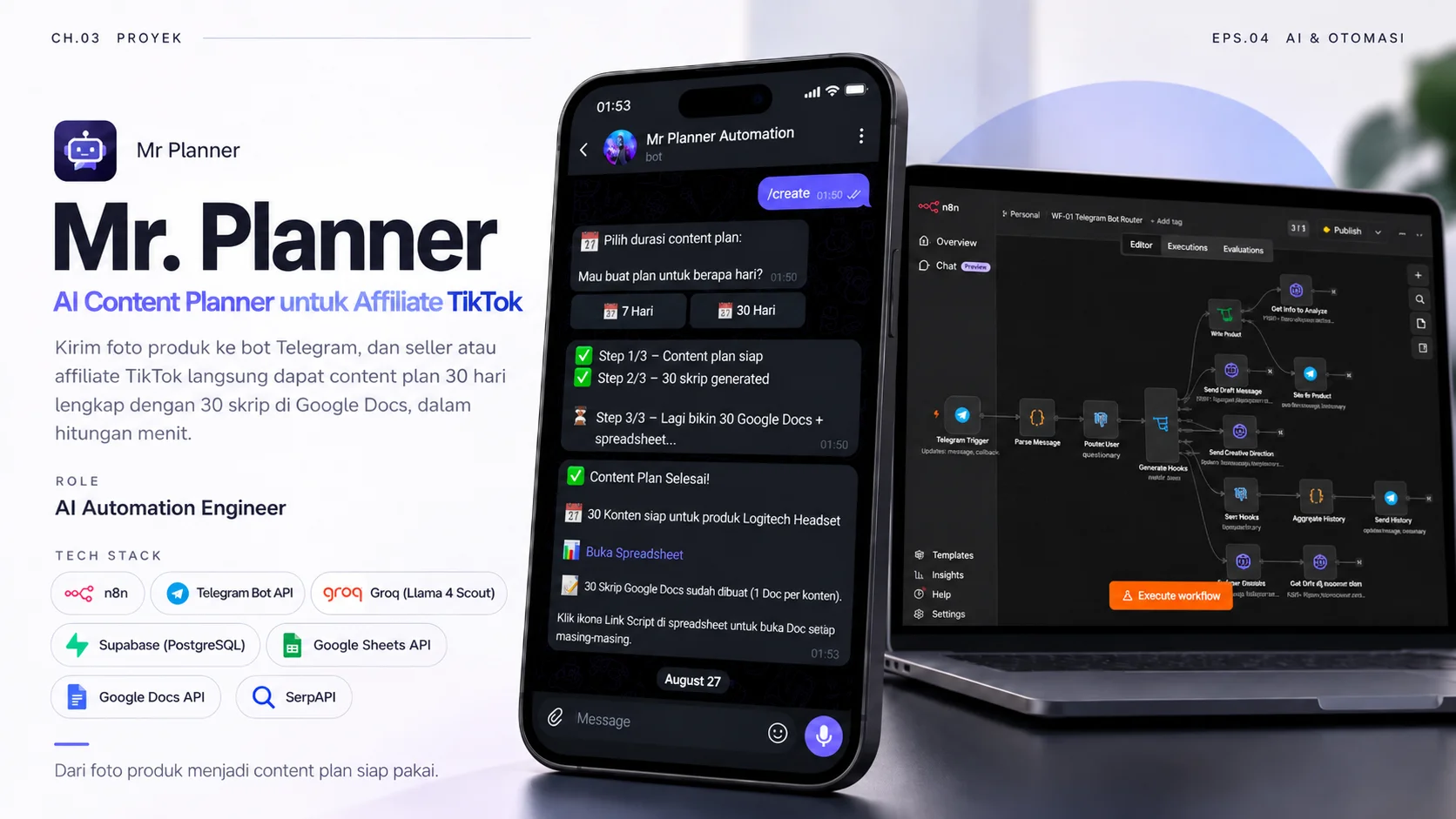
Send a product photo to a Telegram bot and a TikTok seller or affiliate gets a 30-day content plan with 30 scripts in Google Docs, in a matter of minutes.
- Role
- AI Automation Engineer
- Period
- 1–2 weeks
- Tools
-
- n8n
- Telegram Bot API
- Groq (Llama 4 Scout)
- Supabase (PostgreSQL)
- Google Sheets API
- Google Docs API
- SerpAPI
The challenge
TikTok sellers and affiliates have to keep producing content for every product: choosing an angle and writing hooks, captions, hashtags, and video scripts. Planning a month of content by hand takes a lot of time, while the products being promoted keep changing.
My role
I designed and built the whole flow: the Telegram bot, the n8n automation workflows, AI product analysis and script writing, the Supabase database, and the automatic Google Sheets and Google Docs output.
Process
The work took 1–2 weeks. I split the system into four n8n workflows, each with one job: command router, product analysis, content plan generator, and keyword finder. They call each other through webhooks, and every call must carry a secret header that the Verify Secret node checks in the receiving workflow. That way each part can be tested and fixed on its own without breaking the others.
Solution
- One bot, four commands: /start opens a button menu (7 days, 30 days, history), a photo + /analyze analyses a product, /create builds a content plan from the last analysed product (asking for a photo first if there isn’t one), and /history lists the last five plans with their spreadsheet links.
- Product analysis from a photo: the Llama 4 Scout vision model on Groq reads the product photo and sums up its name, description, selling points, and target market before saving them to the database.
- Keywords from Google Trends: in the background, related keywords are pulled from Google Trends Indonesia via SerpAPI and scored 0–100.
- A 7- or 30-day content plan: the user picks a duration and the system drafts a posting schedule with titles, content types (education, soft selling, entertainment), hooks, captions, hashtags, music ideas, and posting times.
- 1 post = 1 Google Doc: every post gets a script with a second-by-second storyboard (visuals, voiceover, and on-screen text), linked from the spreadsheet.
- Progress you can see in the chat: while it works, the bot reports steps 1/3 to 3/3, so users know the system is busy.
- A three-layer AI fallback: Groq’s free quota runs out fast, so every AI call retries on the main account, then switches to a backup account, and if both fail the workflow falls back to a template so users still get a result.
- Locked-down data: the seven Supabase tables use Row Level Security with no policies, so they can’t be read through the public API; only n8n connects to the database directly.
Results
| Task | By hand | With Mr. Planner |
|---|---|---|
| Product research | Reading descriptions and guessing the market | Send 1 photo; AI sums up the target market & selling points |
| A 30-day content plan | Built row by row in a spreadsheet | Generated automatically in about 3 minutes |
| Video scripts | Written one at a time | 30 Google Docs with second-by-second storyboards |
- In the example in the gallery, /create was sent at 01:50 and the 30-day plan with all 30 scripts was ready at 01:53.
- Everything lands in Google Sheets and Google Docs, tools people already use every day, so it’s ready to execute.
Lessons
Splitting a big automation into small workflows that call each other through webhooks made debugging far easier. A free AI quota that runs out fast taught me to design layered fallbacks from day one, all the way down to a template, so users never walk away empty-handed. I also learned that any process taking several minutes needs progress updates; without them, users assume the bot is stuck. Finally, AI output is most useful when it goes straight into the user’s working tools, like spreadsheets and documents, rather than as a wall of text in a chat.
Documentation
-
/analyze — AI reads the product photo and returns the target market and selling points. -
/create — pick a duration and the bot reports progress until the plan is ready. -
The 30-day content plan spreadsheet, one row per post. -
One Google Doc per post, with a second-by-second storyboard. -
WF-01, the router that hands Telegram commands to other workflows. -
WF-02, product analysis with Groq and a fallback path.